Showing posts with label firefox. Show all posts

Wednesday, January 30, 2008

Iranian Firefox Users Survey

A couple of friends have been running a survey for Iranian users of Firefox. It contains at most 17 questions, based on whether you use Firefox, and its version.

It's open for another couple of weeks, and the results will be out soon after that. Till now, there's been more than one thousand participants.

Friday, January 25, 2008

Dot-IR on Firefox IDN White-list

Just a quick notice. ".ir" TLD has been added to the IDN white-list of Firefox, and will be effective on next updates for 2.0 (Gecko 1.8.1.12) and beta-3.0 (Gecko 1.9).

Now you can use your Persian domain names, ".ایران.ir", easily in Firefox. Enjoy it!

P.S. ".ir" has been in white-list in IE since version 7.0.

Monday, October 15, 2007

Internationalized Top-Level Domains

After about a week that eleven Int'lized TLDs had been in root servers, yesterday ICANN officially announced them, the localized IDNwiki pages are open to the world. Here are the Persian one. Go ahead and test your softwares. Firefox has them in the IDN whitelist in the trunk, and will have them in an update for Firefox 2.0 soon. Unfortunately they started using pe as the two-letter code for Persian, which is not a standard, and know it's changed to per. I hope they fix it soon, and use just fa.

This is a big step forward to have dot-iran (.ایران) TLD in the root servers, which has currently more than two thousand registered domains. In fact supporting fully int'lized domain names was one of the major reasons of developing the new IRNIC domain registration system, which has been up since early September. Come on! Register a future dot-iran domain now!

Tuesday, January 02, 2007

Jalali GCal, Version 1.2

Here are an update for Jalali GCal (old: Jalali Calendar for Google Calendar). Installing the new one will replace the previous version. Also I changed its description to Jalali calendar for the web interface of Google Calendar. All features work well on Firefox 1.5 on my Linux desktop. Bug reports are welcomed.

Update: Jalali GCal moved to Google Code

Thursday, September 21, 2006

Mozilla/Firefox Hacks for Power Users (Hack 200C+0002)

Here is some preferences I have set, and you may like to set them, if you are a power user, bidi user, or your locale is not en-US, but have to use this locale.

Newbie HOWTO: use "about:config" to set this key/values.

Power User:
  • layout.word_select.stop_at_punctuation
  • layout.word_select.eat_space_to_next_word
Set them to TRUE if you want Ctrl+Left/Right-Arrows stop at the start/end of alpha-numeric words (like what you get on Gtk+/Gnome). Default values make it to jump to the next/previous Space/Tab character! The second one also affects word boundary on selecting with mouse double-click.

  • browser.triple_click_selects_paragraph
(Mozilla >= 1.9, Firefox >= 3.0a1)
This option allows you to select whether triple click should select the whole paragraph, or just the line you are clicking. If it's FALSE, you can select the whole paragraph with quadruple-click (Wait, it doesn't work on Gtk+/Gnome, as Gtk+ doesn't support quadruple-click. If you like it, here are the Mozilla bug: #348751.)

  • network.http.max-persistent-connctions-per-proxy
  • network.http.max-persistent-connctions-per-server
If you use Tor, or any other proxy in your LAN, just set the first one to a big number (I use 50). Also I set the second one to 8, as Flickr and many other photo-sharing sites use just one domain for almost all images on the their pages, so I cannot get even two pages simultaneously. (maps.google.com is smart enough)

  • network.protocol-handler.external.ed2k
  • network.protocol-handler.app.ed2k
Here are how you can define a protocol and set the external application. In this example, I set ED2K protocol. Create the first key as Boolean, and set the value to TRUE. Then create the second key as String, and set the path to your ed2k link-handler ("/usr/bin/ed2k" for me) as its value. That's it.
Homework: Create a protocol-handler and write a script to handle Yahoo! Messenger links, and make GAIM do the requested action (add buddy, send message, etc). Of course you should mail them to me to get your point. :D)

  • mousewheel.horizscroll.*.action
Try possible values for this key (0..4 IIRC) to get more functions under your fingers (horizontal scroll of your professional mouse, or the touch-pad of your laptop).


Localization:
  • printer.printer_PostScript/*.print_paper_name
If you live in a country (or organization) which the default paper size is A4, not Letter, just set the value of this key to "A4".

  • browser.fixup.alternate.suffix
And if your want to set the default ".com" value to something else (i.e. ".co.uk" or ".ir"), just set it in this key.


Bi-Directional:
  • bidi.browser.ui
And this is the best part for Arabic, Iranian (Persian), and Israeli (Hebrew) users. Setting this key to TRUE will do some magic for you. You can switch the text direction and alignment of input fields with just one keystroke: Ctrk+Shift+X! Also you can switch the page direction from the View menu. Help yourself!

  • mousewheel.horizscroll.*.numlines
If you use Mozilla/Firefox in a right-to-left locale, just set the value of these keys to "1" instead of default "-1". Here are the Mozilla bug: #350594.


Ok, that's all. Let me know if you have problem with this hacks, or other L10n (localization), Bidi (bi-directional), or RTL (right-to-left) problems with Mozilla/Firefox.

Wednesday, May 31, 2006

Jalali Calendar for Google Calendar


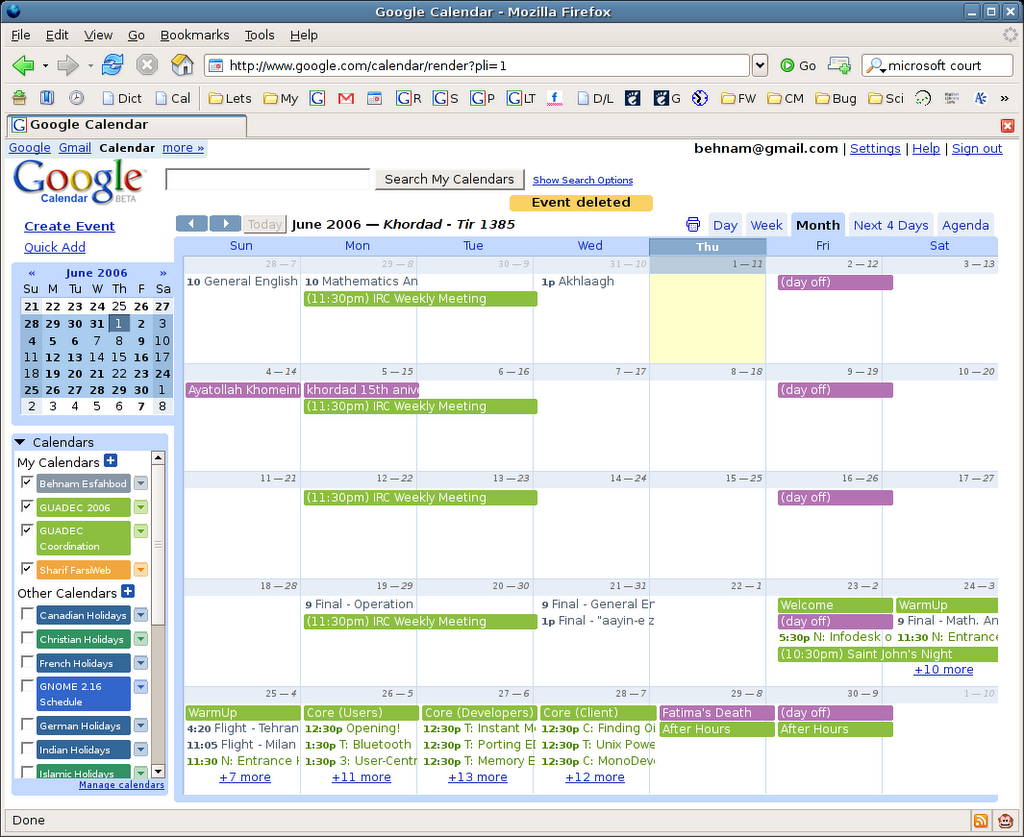
A couple weeks ago, I wrote the Jalali GCal user script (a JavaScript that Firefox runs on the web page if you have GreaseMonkey extension installed) to add Jalali Calendar (A.K.A. Iranian Calendar) to Google Calendar application.

As you can see in the screenshot, it adds Jalali year, month, and month days beside the Gregorian ones. (which makes it really useful for me! ;) This version (v1.1) supports all views: Day, Week, Month, Next 4 Days, and Agenda!

To use it, you should install GreaseMonkey (for Firefox 1.5), then open Jalali GCal user script and install it. Now refresh Google Calendar page.

Of course it's under LGPL license. I hope you like it.

Update: Jalali GCal moved to Google Code

Thursday, November 18, 2004

CyberParty

We had a little MozParty named CyberParty today. We talked about the ways we can spread Firefox around. Here are two photos.


It's me and Soheil, board member of Cyber-Mehr Hi-Tech, Inc. and manager of FarsiLinux' Mozilla Project.


And it's me and Sina, a cool and open minded guy.